v0.6.0 · Free · Open source · MIT
Sign PDFs with your DSC token.
A small desktop app for Windows, macOS and Linux. Plug in your Class 3 token, place the signature, enter your PIN. Adobe Reader shows it as valid, and signatures already on the document stay valid.
- Platforms
- Windows 10/11 · macOS 11+ · Linux
- Network
- Not needed — works offline
- Account
- Not needed
EXAMPLE VENTURES PRIVATE LIMITED
CIN U72900TN2021PTC000000 · Sample document
Certified true copy of the resolution passed at the meeting of the Board of Directors held on 23 October 2026
RESOLVED THAT the audited financial statements for the financial year ended 31 March 2026, together with the Board's report and the auditor's report thereon, be and are hereby approved.
RESOLVED FURTHER THAT any director of the Company be authorised to sign the said statements digitally and file them with the Registrar of Companies.
- Ready. Token: HYP2003 · DSC: YOUR NAME (Class 3)
How it works
Your original bytes are never rewritten.
Many PDF tools re-save the whole file when they add a signature, which silently breaks the auditor's or co-director's signature already on it. TrackMy Sign appends its signature after the last byte, the way the PDF standard intends for documents signed by more than one person.
-
Open the PDF
Drag it into the window. The app finds your token through the PKCS#11 driver that came with it.
-
Place the signature
Click anywhere on any page; drag to move, drag the corner to resize. The position is remembered.
-
Enter the PIN
The token signs a SHA-256 hash; the key never leaves it. The copy is saved as
name_signed.pdf.
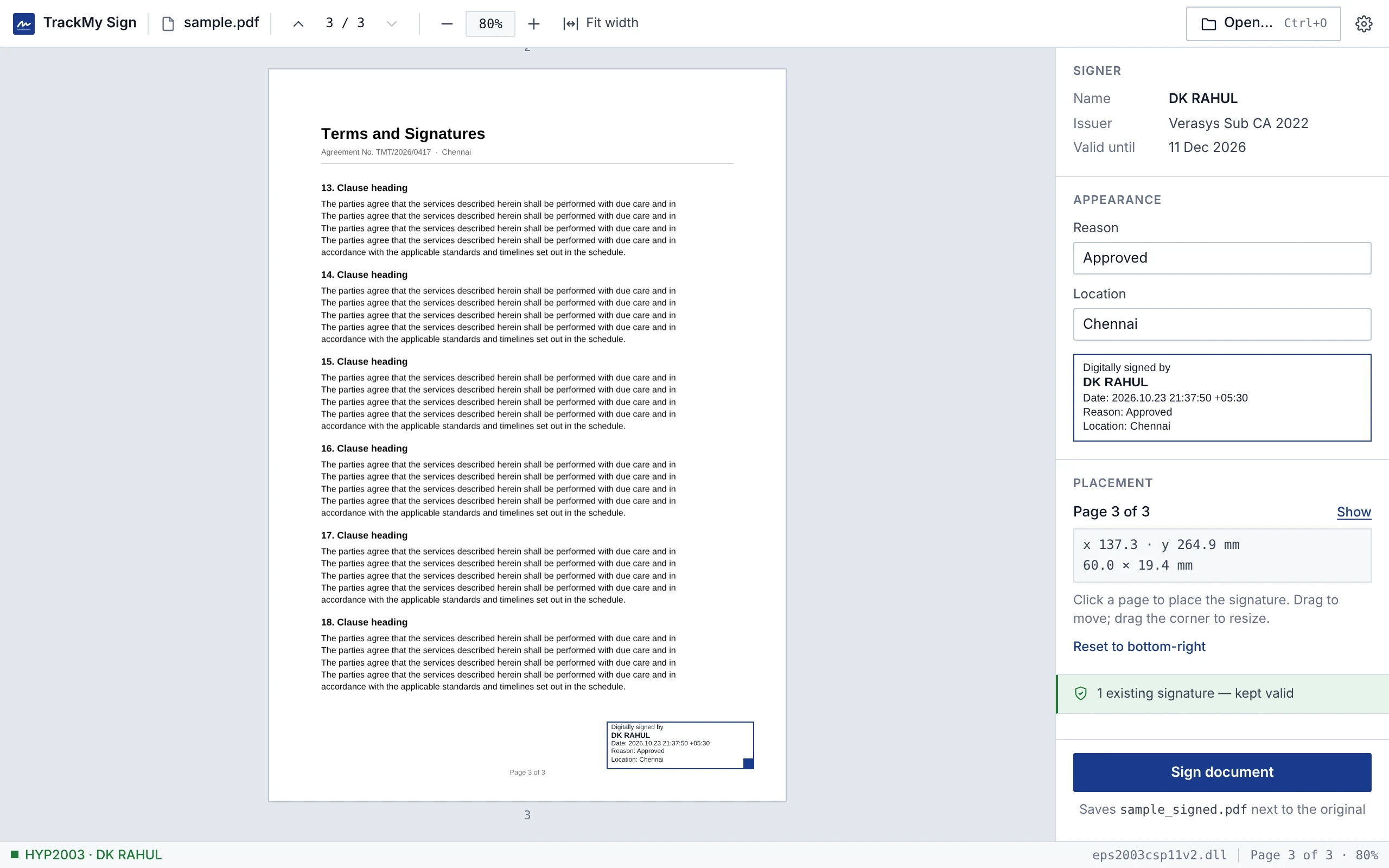
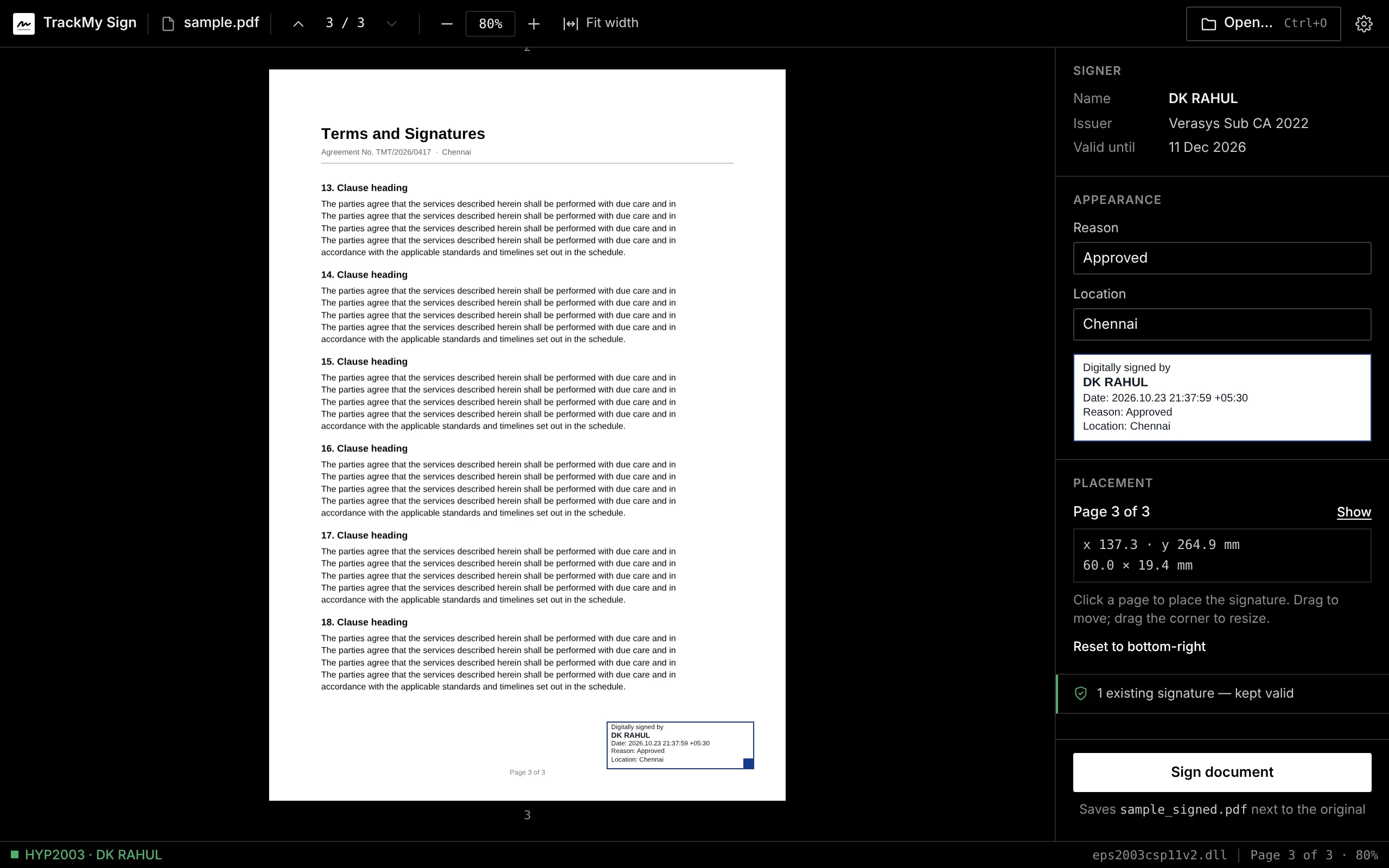
The app
One window. No setup wizard, no account.
Toolbar with page and zoom controls, the document in the middle, and everything about the signature on the right: signer, stamp text, position in millimetres. The status bar shows which token and driver are in use.
Features · v0.6
Everything a director signs, in one small app.
From a single board resolution to a folder of invoices. Every feature writes a standard signature that Adobe Reader and other validators accept, with your DSC token and nothing else.
01 / 05
Signing
Standard PDF signatures from your USB token, for one document or a stack of them.
Signing in detail-
Tokens
Every common Indian DSC token
Drivers for the tokens Indian Certifying Authorities ship are found automatically, and certificates from all of them are listed together.
- HyperPKI · ePass2003 · ProxKey · mToken
- Trust Key · Watchdata · SafeNet · IDPrime · Bit4id
- Per-signature-PIN keys supported
-
Batch
Many PDFs, one PIN
Select a stack of PDFs, place the box once and sign them all in one session. A file that fails never stops the rest.
- One PIN entry for the whole batch
- Box position shared across files
- Signed copies never overwrite a file
-
Pages
Every page, one signature
Show the signature box on all pages or a range such as 1-3, 5. It is still one signature and one PIN entry.
- All pages or ranges like 1-3, 5
- One /ByteRange, one PIN
- Same box position on each page
-
Forms
Sign into existing boxes
Bank and government PDFs often carry empty signature fields. Click one and the signature fills it, honouring its locks.
- Empty fields highlighted and listed
- FieldMDP locks recorded in the signature
- Unsupported field formats refused, with a reason
-
Certify
Lock the document
Make the first signature a certification that says what may change afterwards.
- No changes allowed
- Form filling and signing
- Also comments (DocMDP 1–3)
-
Long-term
Valid after the DSC expires
Optional trusted timestamp and embedded revocation data, so the signature can still be checked years later.
- RFC 3161 timestamp
- OCSP and CRL answers in /DSS (PAdES LTV)
- Off by default: signing stays offline
02 / 05
Documents & files
The signature box the way your office wants it, and the files you get from banks, auditors and portals.
Documents & files in detail-
Designer
Design your signature box
Company seal or logo, “For Company — Director” lines, fonts, colours, border and date format, with a preview that matches the PDF exactly.
- Seal beside or behind the text
- Helvetica, Times or Courier
- Four date formats, two custom lines
-
Stamp
Handwritten signature image
Add a scanned signature beside or above the “Digitally signed by” text.
- PNG with transparency or JPEG
- Left of or above the text
- Visible box or invisible signature
-
Presets
Presets for each kind of document
Save the reason, location, box position, pages and design once, and pick them per document.
- Reason, location, placement in mm
- Signature image and design
- Used by the watch folder
-
Prepare
Page tools
Merge PDFs, reorder, rotate, delete or insert pages, and save a prepared copy ready to sign. The original is never changed.
- Drag to reorder, rotate, delete
- Insert blank pages, append PDFs
- Undo with Ctrl+Z
-
Protected
Password-protected PDFs
Opens RC4 and AES encrypted PDFs. The signed copy keeps the same password and restrictions.
- RC4 40/128-bit, AES-128, AES-256
- Password asked for, never stored
- Owner password if signing is restricted
-
Files
Sign any file (.p7s / .p7m)
Sign Word, Excel, ZIP or XML files as a standard CMS signature, and check signatures you receive.
- Detached .p7s or attached .p7m
- CAdES-BES; CAdES-T with a timestamp
- Verifiable with OpenSSL
03 / 05
Verification & records
Check what you receive, prove what you signed, and know when your DSC runs out.
Verification & records in detail-
Verify
Check any signed PDF
See who signed, whether each signature is valid, whether the chain reaches CCA India, and what changed after signing.
- Integrity of the signed bytes
- Chain to the CCA India 2022 root
- Changes after each signature
-
Audit
Verification report
Export a PDF report of every signature in a document for auditors, or JSON from the command line.
- A4 PDF with the file's SHA-256
- Time of check in IST and UTC
- JSON with a documented schema
-
Folders
Verify a whole folder
Check every signed PDF in a folder at once, filter the problems, and export one PDF report or a spreadsheet.
- Subfolders optional
- Filter: all, problems, unsigned
- PDF report and CSV export
-
History
Signing history
A private, tamper-evident log of everything you sign, with search and CSV or PDF export. Can be turned off.
- Hash-chained JSON Lines, one file per month
- Search by file, signer, date, source
- Never holds a PIN or document content
-
Certificate
See and share your DSC
Class, CA, validity, fingerprints and chain at a glance. Save the public certificate for a bank or portal that asks for it.
- Class 1/2/3 and eKYC policies named
- SHA-1 and SHA-256 fingerprints
- Export .cer, .pem or .p7b
-
Reminders
DSC expiry reminder
Days left are always shown, with a reminder before your certificate expires, even when the token is not plugged in.
- 30 days ahead by default
- 15, 60 days or off
- Expired certificates are refused
04 / 05
Automation
Signing that happens where the work already is: the GST portal, a folder, the file manager, a script.
Automation in detail-
GST portal
Sign on the GST portal
Turn on portal signing and the GST portal signs DSC registration and returns through TrackMy Sign. Every request asks for your approval and PIN.
- gst.gov.in only; listens on 127.0.0.1
- Shows the PAN and what will be signed
- Not for MCA21 V3 or Income Tax
-
Background
Always ready for the portal
Runs from the tray or menu bar and can start when you sign in, so portal signing works without opening the app.
- System tray or macOS menu bar
- Start at sign-in, without a window
- Shows portal status and port
-
Watch
Watch folder
Drop PDFs into a private folder and they are signed with your preset after one PIN entry, with time and daily limits.
- Stops after 1 h, 8 h or when stopped
- Daily limit, 200 files by default
- signed/, done/ and failed/ folders
-
Desktop
Right-click to sign
Select one or many PDFs in Explorer, Finder or your file manager and sign them as one batch. Your default PDF viewer stays as it is.
- Sign with TrackMy Sign on Windows
- Open With on Windows, macOS, Linux
- Up to 100 files from Explorer
-
Command line
A command-line tool
Everything the app signs and checks is also a command, for scripts and batch jobs.
- Windows, macOS and Linux binaries
- certs · sign · verify · watch · pages
- Same signing engine as the app
-
Scripts
JSON, CSV and exit codes
Verification and history results come out as JSON or CSV, with exit codes a script can act on.
- Versioned JSON schemas
- Exit status 2 on problems
- CSV with one row per signature
05 / 05
Platform & privacy
A small native app that works offline, in your language, on the computer you already have.
Platform & privacy in detail-
Privacy
Offline, no account
Your documents, certificates and PIN never leave your computer. You can sign with the network cable unplugged.
- No server, no account, no telemetry
- PIN never stored
- Online only for updates and, if enabled, timestamps
-
Platforms
Windows, macOS and Linux
Native apps for all three, with the same features. Small downloads, no admin rights needed on Windows.
- Windows 10/11 x64, per-user install
- macOS 11+, Apple Silicon and Intel
- Linux AppImage and .deb
-
Updates
One-click updates
New versions are offered in the app and install when you say so, after a signature check.
- Checks GitHub Releases on launch
- Update checked against a key built into the app
- Can be turned off
-
Languages
English, हिन्दी, தமிழ்
The whole app in Hindi or Tamil, following your system language or chosen in Settings.
- English, Hindi, Tamil
- Follows the system language
- Signature box text stays in English
-
Recent
Pick up where you left off
Recent documents on the start screen, the last folder remembered, and an optional folder for signed copies.
- Last 10 PDFs, signed ones marked
- Open dialog starts in the last folder
- Signed copies never overwrite a file
-
Open source
Open source, built in public
MIT licensed. Every release is built by GitHub Actions from the public source, and tested against an independent validator.
- MIT licence
- Releases built by GitHub Actions
- Signatures checked with pyHanko and qpdf in CI
Specification
What it produces, exactly.
The signing engine is a small Rust library you can read in an afternoon. Every release is built by GitHub Actions from the public source.
- Signature format
- PKCS#7 / CMS detached adbe.pkcs7.detached, SHA-256, signingCertificateV2
- Signature types
- Approval, or certification with DocMDP levels 1–3; FieldMDP locks honoured
- Long-term validity
- Optional RFC 3161 timestamp and /DSS with OCSP and CRL data (PAdES LTV)
- Encrypted PDFs
- RC4 40/128-bit, AES-128, AES-256 (revisions 2–6)
- Write method
- Incremental update; original bytes never rewritten
- Token access
- PKCS#11 through the token's own driver; the private key never leaves the token
- Verified in
- Adobe Acrobat Reader — “Signature is valid”, trust via AATL
- Tokens
- Tested with Hypersecu HyperPKI HYP2003; drivers for ePass2003, ProxKey, mToken, Trust Key, Watchdata, SafeNet, Gemalto, Bit4id and OpenSC detected automatically
- Platforms
- Windows 10/11 x64 · macOS 11+ Apple Silicon and Intel · Linux x86_64 (glibc 2.35+, e.g. Ubuntu 22.04+)
- Download
- 3.0 MB Windows · 7.5 MB macOS · 4.2 MB Linux .deb
- Privacy
- Offline by default, no account, no telemetry; the PIN is never stored. Online only for update checks and, if enabled, timestamps and revocation data
- Licence
- MIT
- Built with
- Rust · Tauri 2 · React · PDF.js (legacy build)
Download
Get TrackMy Sign v0.6.0
- Install your token's driver if it isn't installed yet (it comes with the token).
- Run the installer. It installs for your user only and needs no admin rights.
- If SmartScreen says “Windows protected your PC”, choose More info → Run anyway.
- Install your token's macOS driver from its vendor.
- Open the .dmg and drag TrackMy Sign into Applications.
- Install your token's Linux driver from its vendor (or OpenSC) and pcscd.
- AppImage: make it executable (chmod +x) and run it. Debian or Ubuntu: sudo apt install ./TrackMySign-linux-amd64.deb.
> trackmysign certs
1. DK RAHUL (Personal)
   Issued by: Verasys Sub CA 2022
> trackmysign sign statements.pdf --reason "Approved"
Token PIN: ********
Signed: statements_signed.pdf
macOS app signed and notarized by Apple · Windows installer not code-signed yet · Code signing policy
Build from source
Rust 1.80+ and Node 20+.
$ git clone https://github.com/rahuldk1105/trackmysign
$ cd trackmysign/apps/desktop && npm ci && npx tauri build
FAQ
Questions directors ask.
Is a signature made with TrackMy Sign legally valid?
The legal weight comes from your DSC, issued by a licensed Certifying Authority under the IT Act, 2000, not from the software that applies it. TrackMy Sign produces a standard PKCS#7 signature with your certificate, which Adobe Reader verifies like any other DSC signature.
Is my document uploaded anywhere?
No. The app has no server and your documents, certificates and PIN never leave your computer. You can sign with the network cable unplugged. It only goes online to check for updates (can be turned off) and, if you switch them on, for a trusted timestamp or revocation info. See the privacy statement.
Will it break signatures already on the PDF?
No. It writes an incremental update after the existing bytes instead of re-saving the file, which is what keeps earlier signatures valid.
Which tokens work?
Tested with Hypersecu HyperPKI HYP2003. The app also looks for the drivers of Feitian ePass2003, Watchdata ProxKey, mToken CryptoID, Trust Key, SafeNet eToken, Gemalto IDPrime and Bit4id, and lists certificates from every one it finds. If yours isn't detected, open an issue with the token's name and driver file.
Can I use it for MCA filings?
It signs PDFs: financial statements, resolutions, attachments. On the GST portal it can also sign without a separate signer utility (turn on Settings → GST portal signing). MCA21 V3 and the Income Tax portal use eMudhra's emBridge with licensed encryption, so keep using emBridge there.
Why does Windows warn me during install?
The Windows installer isn't code-signed yet, so SmartScreen doesn't recognise the publisher: choose More info, then Run anyway. Every release is built in public by GitHub Actions from the source in the repository, and the macOS app is signed and notarized by Apple.